


AI Scientific Figure Generator
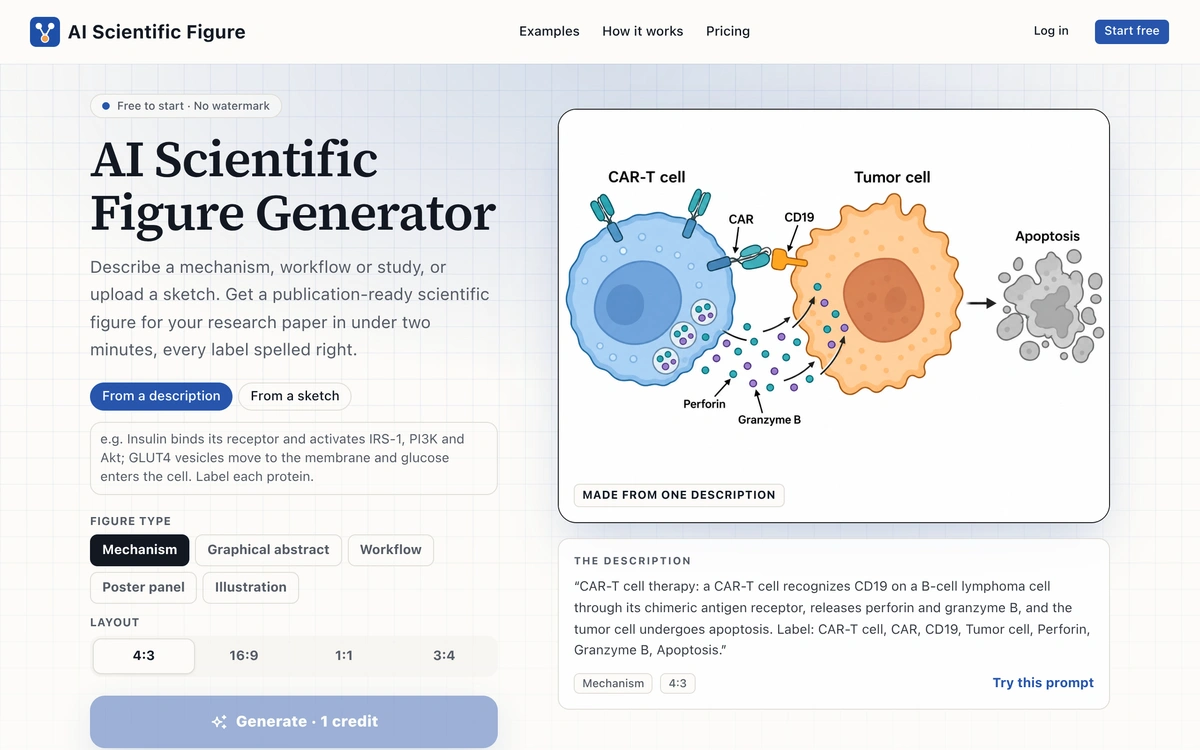
Free AI scientific figure generator that transforms descriptions, sketches, or abstracts into publication-ready figures with clean labels and no watermarks.
AI Scientific Figure is a free online tool that generates high-quality scientific figures from user-provided descriptions, sketches, or abstracts, making it ideal for researchers and academics.
Features of AI Scientific Figure Generator
Fast Generation: Create publication-ready figures in under two minutes.
High Resolution: Outputs figures in 2K PNG format at 300 DPI, suitable for journals.
No Watermarks: All generated figures are free of watermarks, ensuring a professional appearance.
User-Friendly Interface: Simple input methods allow users to describe mechanisms or upload sketches easily.
Flexible Output Types: Supports various figure types including mechanisms, workflows, and graphical abstracts.
Use Cases of AI Scientific Figure Generator
Research Papers: Generate figures for academic publications quickly and efficiently.
Presentations: Create visually appealing figures for conference presentations or lectures.
Posters: Design figures for scientific posters that meet publication standards.
Educational Materials: Produce clear and informative figures for teaching resources.
Grant Proposals: Enhance grant applications with professional-quality figures that illustrate research concepts.
Traffic and audience figures are self-reported by the owner, last updated today.
Get in Touch
Interested in this opportunity? Contact the owner to explore details and potential collaboration.
Sign in to contact the listing owner
You May Also Like

aifeed
aifeed.dev
aifeed is a curated feed providing timely links to the latest news, tools, and developments in artificial intelligence and technology.

VideoToScript
videotoscript.app
Turn TikTok, Instagram Reels, YouTube Shorts and Facebook videos into accurate, timestamped transcripts. Export as TXT, SRT or VTT. Free tier included.
Kling 4.0
www-kling.com
Create with Kling 4.0 using text prompts or first and last frames. Choose 5–30 seconds, set your output quality, and explore a scene with optional audio in one workspace.